
If you are going to China for the first time, the short answer is this:
You do not need 15 apps. You need the right 5 to 8 apps, set up before you fly.
Most first-time travelers make the same mistake. They search for a giant "best apps for China" list, download everything, and still arrive unprepared.
That is because the real problem is not app quantity. It is arrival-day friction.
The apps that matter most are the ones that help you do these things without panic:
- pay for basic things
- get from the airport to your hotel
- navigate without Google Maps
- communicate when you do not speak Chinese
- book trains, hotels, or tickets
- stay reachable if your usual apps do not work
This guide is built for that reality.
The short list: what apps do you actually need before going to China?

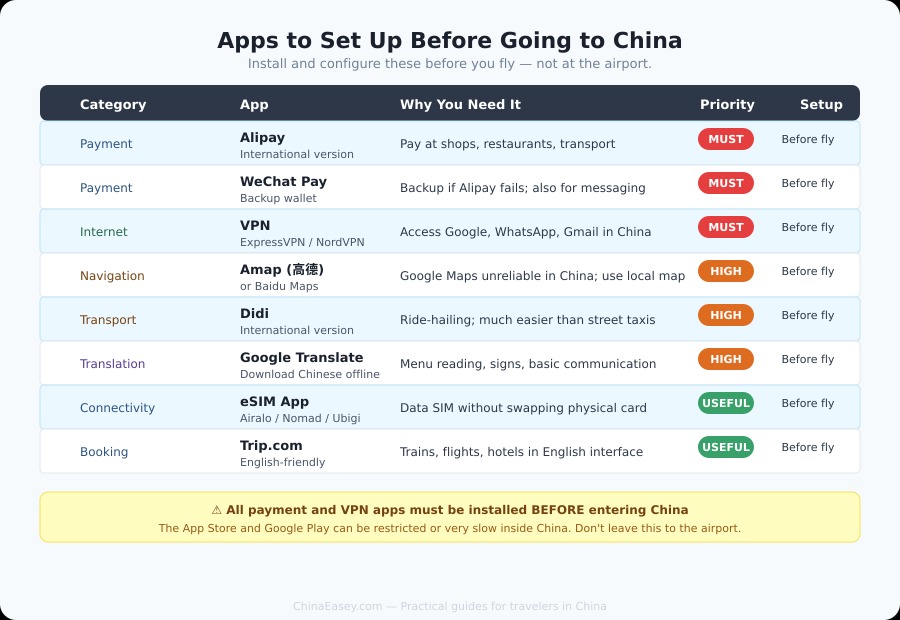
Apps to install before going to China — checklist by category, priority, and setup timing
If you want the most practical answer, start here.
Install these before departure:
- Alipay – for payments and a lot of daily service access
- WeChat – for messaging, QR code contact, and some payments / mini programs
- Amap or Apple Maps – for navigation
- DiDi – for ride-hailing
- Trip.com – for trains, flights, hotels, and itinerary backup
- Pleco or Google Translate – for language support
- A working VPN or your connectivity fallback – if you need access to blocked services
- An eSIM / roaming app or your carrier setup – so your phone works the moment you land
If you are trying to stay lean, these are the minimum categories that matter.
Why app prep matters more in China than in many other countries
China is extremely phone-driven in day-to-day life. That is not hype. It affects basic travel tasks.
In many places, you can improvise after landing. In China, improvising is much riskier because:
- many Western apps are unreliable or blocked
- a lot of daily transactions are QR-code based
- map quality differs a lot between apps
- local transport, food, and service workflows often happen inside Chinese platforms
- setup can be harder once you are already tired, jet-lagged, and on hotel Wi-Fi
The goal is not to become a power user. The goal is to arrive operational.
Tier 1: install these no matter what
Alipay
If you only install one China-specific utility app before departure, make it Alipay.
Why it matters:
- widely used for everyday payments
- often easier for foreigners to start with than many people expect
- can help with stores, taxis, and many QR-based situations
- useful even if you also plan to use cash or cards as backup
What to do before you fly:
- download the app from your normal app store
- link your foreign bank card if supported for your case
- complete identity checks if prompted
- test that the app opens normally and your account is accessible
What it does not solve: not every card setup works equally smoothly. Some users still hit verification or acceptance friction. That is why Alipay is essential, but not your only fallback.
WeChat is not just a messaging app. In China, it is also part contact tool, part service layer, part QR habit.
Why it matters:
- many hotels, hosts, local contacts, and service providers prefer WeChat
- QR code sharing is common
- some services run through mini programs
- having WeChat ready makes coordination much easier
Create your account early, make sure you can log in, and do not wait until airport arrival to handle account verification surprises.
Amap or Apple Maps
Do not assume Google Maps will be your main China navigation tool.
For most first-time travelers, the safer choice is Amap (Gaode) if you are willing to use a local maps app, or Apple Maps if you are on iPhone and want a simpler transition.
Before departure, install one navigation app you are actually willing to use, save your hotel name and address in English and Chinese, and save airport and train station pins.
DiDi
DiDi is one of the cleanest ways to reduce arrival-day stress. Install the app, create your account, and save your hotel address in Chinese before departure. If you land late or arrive in an unfamiliar city, DiDi moves from "nice to have" to "highly practical."
Trip.com
Less glamorous, but extremely useful. Trains, flights, hotels, and attraction booking in one familiar English interface. Install it before departure and store your first hotel and transport bookings offline if possible.
Tier 2: strongly recommended for most travelers
Pleco or Google Translate
You may not need this every hour, but when you need it, you really need it — for reading menus, signs, addresses, and medicine labels. Download offline Chinese language packs before flying. Do not assume English support will carry you through every small situation.
VPN or connectivity fallback
The real question is not "Which VPN should I download?" It is: what will you do if the apps and sites you rely on do not work normally after landing?
If your work, family communication, or daily coordination depends on Gmail, WhatsApp, Instagram, or Google-based tools, do not leave this as a last-minute experiment. A VPN must be installed and tested before you enter China — you cannot easily download or set one up once you are there.
eSIM / roaming setup
Your phone is only helpful if it is online. Before departure, confirm how you will get data after landing, whether your eSIM is installed and activated correctly, and whether you have a backup if your first connectivity plan fails. A lot of app stress is really connectivity stress in disguise.
Before departure vs after arrival

China app setup checklist — what to do before departure vs what can wait
Set up before departure:
- app downloads and account creation
- card linking and identity verification where needed
- eSIM / roaming activation
- hotel and transport address saving
- backup screenshots or saved booking details
Can wait until after arrival:
- food delivery apps (Meituan, Ele.me)
- local review and discovery apps (Dianping)
- shopping or lifestyle apps
If an app is needed for payment, navigation, communication, or getting from the airport to your hotel — it belongs in the pre-departure bucket.
Common mistakes travelers make with China apps
Downloading too many apps. More apps do not equal more readiness. They usually create more confusion.
Not testing login or verification early. Account issues are much easier to solve when you are at home than when you are standing in an airport.
Assuming cash or foreign cards will remove the need for app prep. Sometimes they help. Sometimes they do not. You want options, not assumptions.
Relying on Western defaults. Google Maps, Uber, or your normal daily stack may not be the right operational layer in China.
Ignoring the first 24 hours. Your first day is where most avoidable friction happens. Build for that moment.
Your first-24-hours app checklist
Before boarding, you should be able to say yes to all of these:
- ☐ I can get online after landing
- ☐ I have one working payment app ready to try
- ☐ I have WeChat installed and accessible
- ☐ I have one China-usable navigation app ready
- ☐ I can check rides and transport details
- ☐ I have my hotel name, address, and confirmation saved
- ☐ I have one translation fallback
- ☐ I have a backup plan if payments fail
If you cannot check most of those, you are not app-ready yet.
FAQ
What is the most important app to have in China as a tourist?
Alipay. It covers the payment layer that affects almost every daily transaction in China. Set it up before departure, link your foreign card, and test it. After Alipay, WeChat and a reliable navigation app are next.
Does Google Maps work in China?
Unreliably. Google Maps often shows shifted or outdated data inside mainland China. Use Amap (Gaode) or Apple Maps instead.
Can I download apps after arriving in China?
Some apps, yes. But the App Store and Google Play can be slow or restricted inside China. Download everything you need before boarding. This is especially true for VPNs — they cannot be downloaded from China's app stores.
Do I need WeChat if I already have Alipay?
Yes. WeChat is used for messaging, QR contacts, and mini-program services in ways Alipay is not. Many locals, hotels, and businesses prefer WeChat for communication. Have both ready.
Is a VPN legal for tourists in China?
This is a nuanced question. Personal VPN use by tourists sits in a grey area. Practically speaking, many travelers use VPNs with no issues, but the situation can change. The key point for this guide: if you need one, install and test it before you land.
Don't Want to Figure This Out at the Airport?
We built ChinaEasey for exactly this problem — the setup friction that trips people up before and after landing. The China Survival Kit covers payments, connectivity, navigation, and first-24-hours logistics in one place.
Need more than the guide?
This guide covers the basics. If real-world friction shows up, you can compare the support options and choose the level of human backup that fits your trip.